Admin Console
The Admin Console module provides access to Administrators to configure and manage the WISdom environment. Non-administrative users (Regular Users) have access to various screens within the Admin Console but have read-only access.
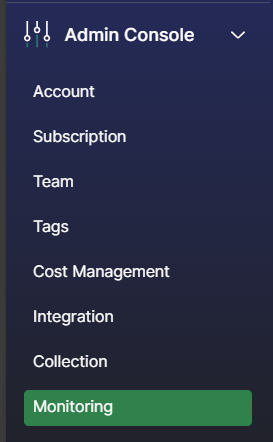
- Account - Provides information about your WISdom account.
- Subscription - Provides information about your WISdom license(s) and subscription status.
- Team - The WISdom User management area.
- Invite new users to access WISdom.
- Control the permissions they will have via their Profile.
- Remove or disable users.
- View all users and their current status and permissions.
- Tags - Controls creation and editing of Tags.
- Cost Management - Allows for creation of custom cost profiles for Licensing, Storage, and Server Types.
- Integration - Link WISdom to other applications for Authentication, Ticketing, and Notifications.
- Collection - The management area for all things data collection.
- Data Collectors - Where Data Collectors are viewed and managed.
- Create or Delete collectors.
- Download the installation package (exe) for each collector.
- Resources - Add and Remove resources (Instances and Hosts) from monitoring.
- Credentials - Manage secondary credentials to be used for data collections.
- Create or Edit secondary credentials.
- Choose or update the display name for the credentials.
- Choose or modify the data collector a set of credentials are assigned.
- Update the password for the account.
- Create or Edit secondary credentials.
- Data Collectors - Where Data Collectors are viewed and managed.
- Monitoring - The management area for alerting and notifications.